// TROUPE ARCHITECTURE

How Troupe is built and governed

Troupe runs coding agents for an organisation, and it runs them under rules. A versioned profile says what a workload may touch, how much it may spend and who has to approve what it does, so a team can put agents on a shared cluster while the people responsible for data, security and infrastructure keep their say.

We drew the core mechanics to show how the pieces fit. Each diagram maps one part of the system, and the text under it covers the trade-off: why we chose this, what it gets you, and which operational problems it was built to avoid. Five chapters; read down, or jump to one.

// THE ABSTRACTIONS

What the pieces are, and where the boundaries fall.

// WHAT IS INSIDE WHAT

Four layers

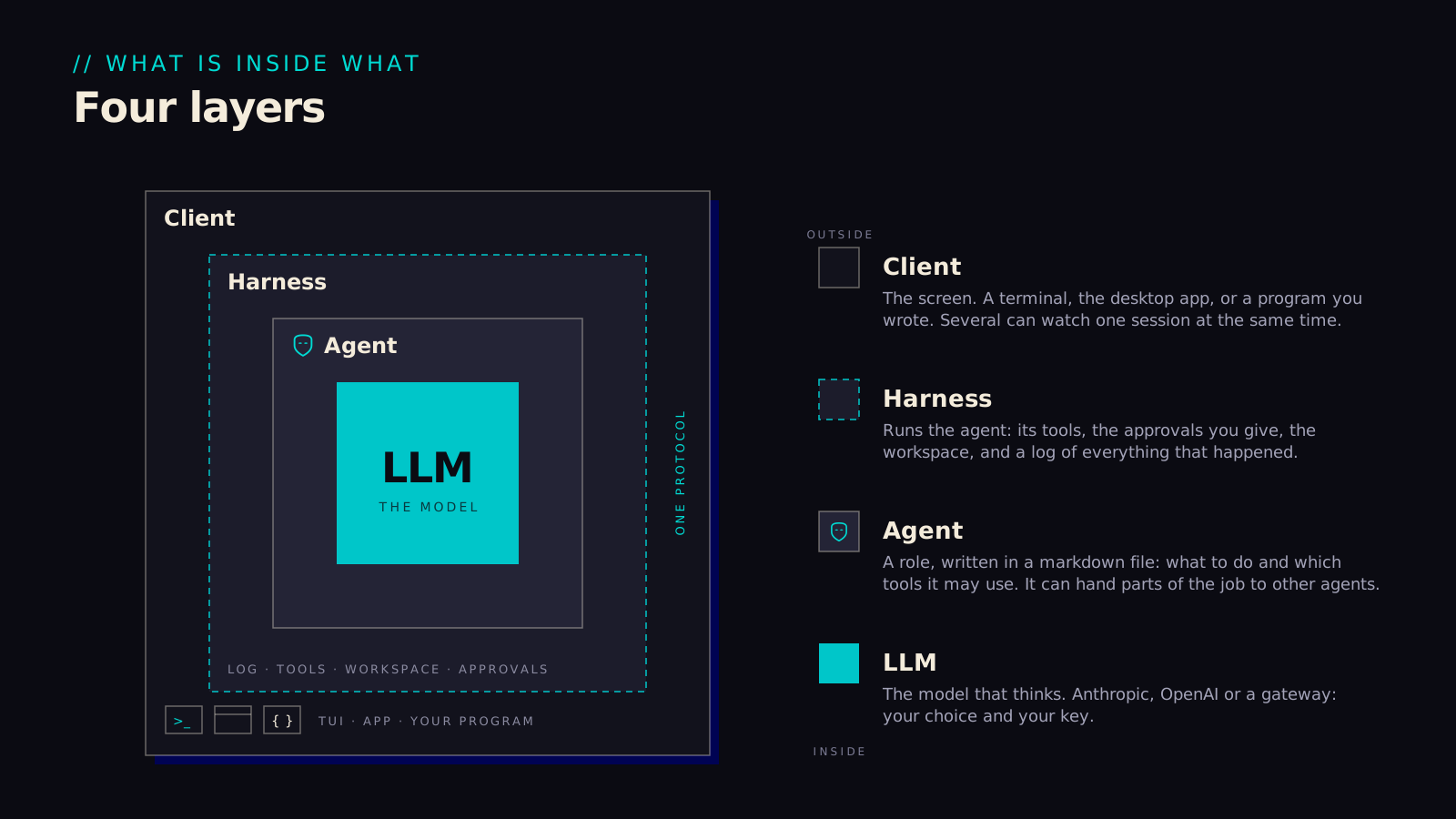
The model is the one part we didn't write, so it sits in the middle with everything we control wrapped around it.

That arrangement is what lets the model be swapped with a line of configuration. Which files an agent may touch, who said yes to a command, what a turn cost and what got logged are all decided in the harness, outside the model, so a different model changes the answers you get and nothing about the rules. The outer edge of the harness is one protocol, and our own clients use the same door as everyone else's. The console can't do anything a script couldn't, which also means an audit looks the same whichever client produced the events.

Four nested squares: LLM, agent, harness, client, with the protocol at the harness's edge.
01-four-layers.svg
// THE SAME HARNESS, TWO HOMES

Where the work runs

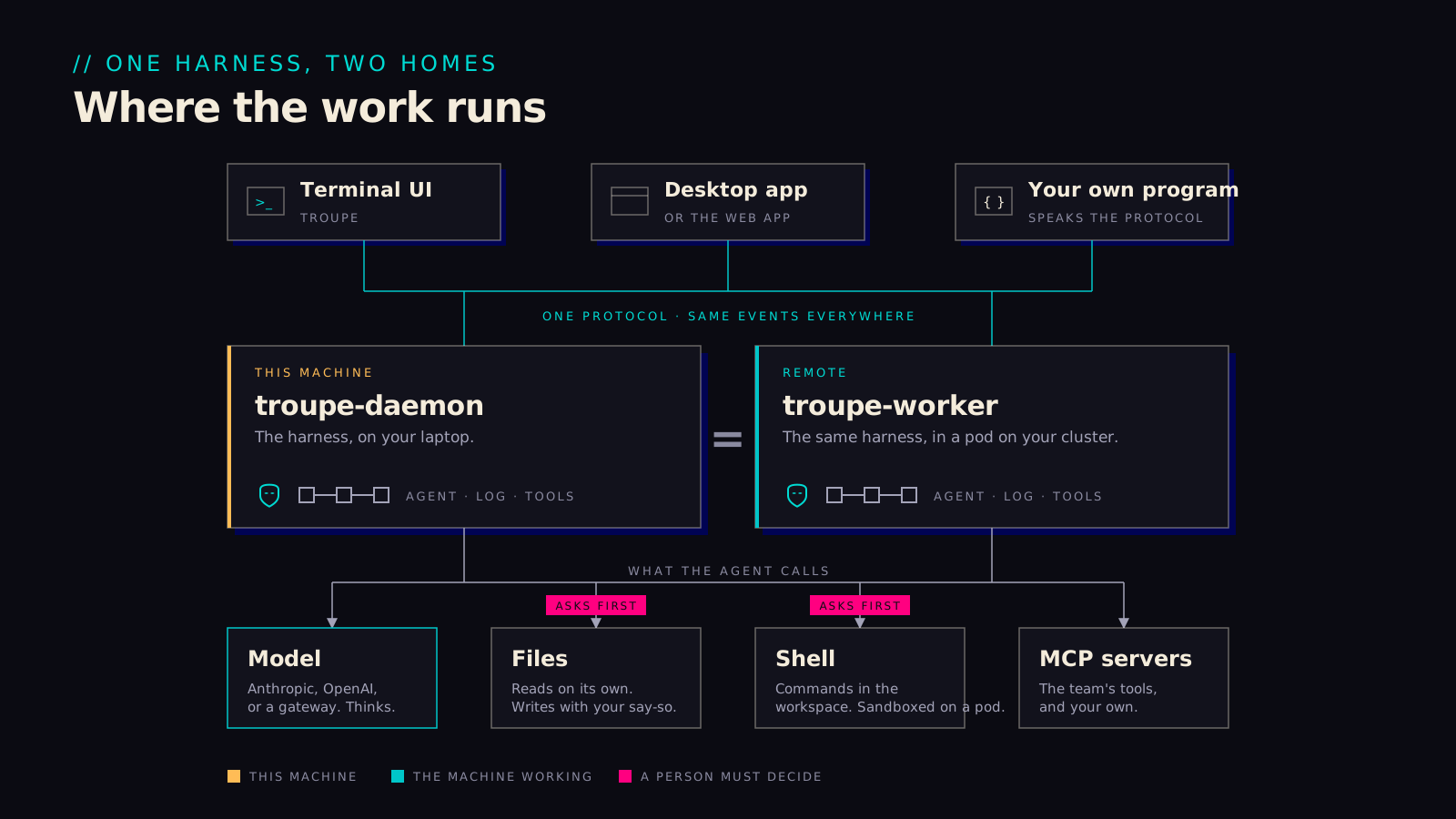
The same harness runs on your laptop as the daemon and on the cluster as a worker. The difference is mostly about who gets to set the rules.

You can try everything alone on a laptop first, then run the same kind of session on the cluster without learning a second product; the terminal, the desktop app and anything written against the protocol work in both places. At home, your own configuration decides which calls ask you first. On a pod the profile decides that, and a repository's files can tighten it but never loosen it. Either way the rules are consulted before a write or a shell command runs, which is probably the single property people care most about once they have watched an agent work for a while.

Three clients over one protocol; the daemon on a laptop and the worker in a pod as the same harness.
02-where-the-work-runs.svg
// ASK ONCE, THEN TALK DIRECTLY

The plane and the pods

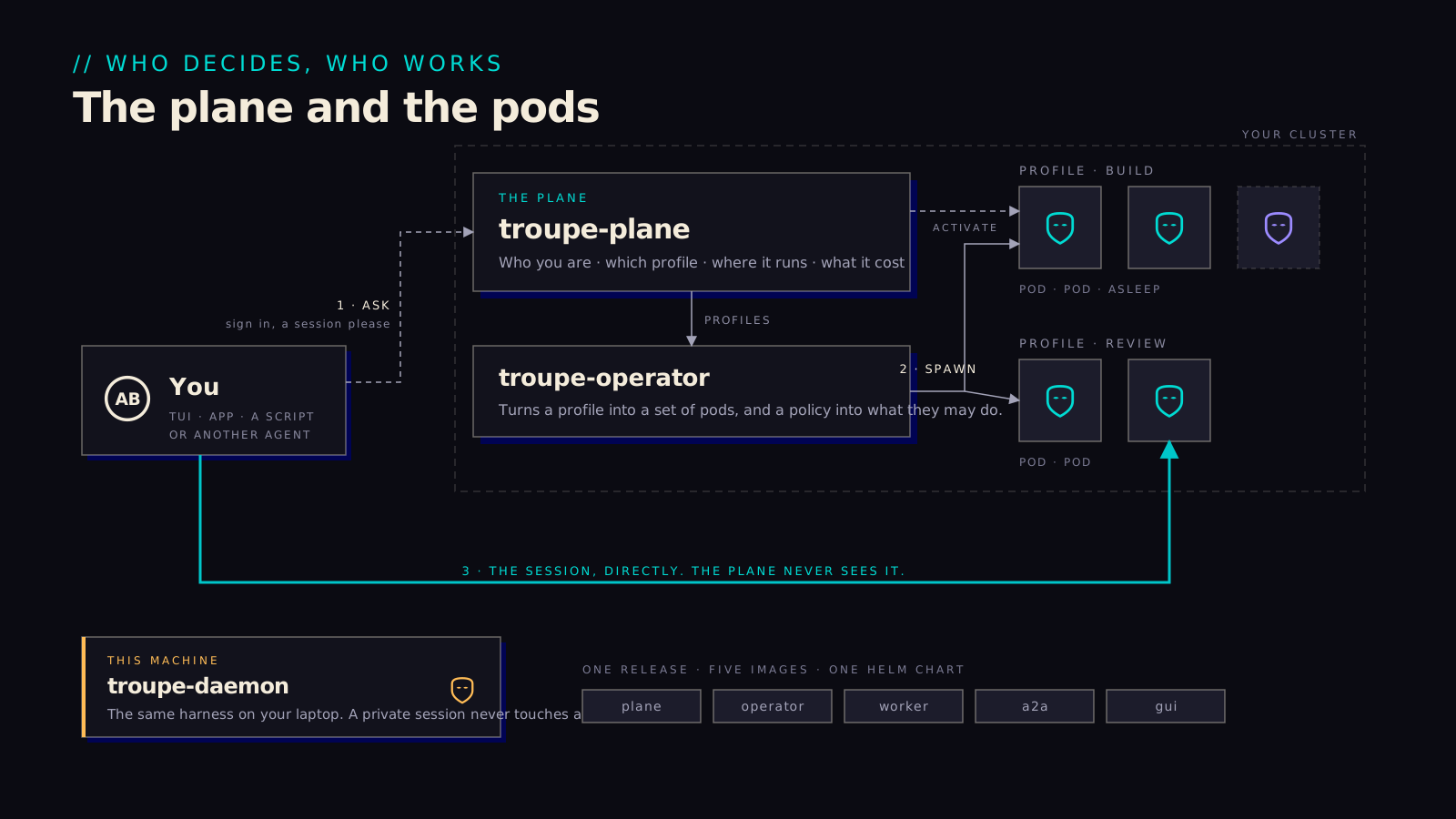
The plane handles routing and permissions, and it stays completely out of the data path.

When a client needs a session, it asks the plane. The plane assigns a pod and issues a short-lived token, and from that point on the client talks directly to the pod. We built it this way so that session content bypasses the plane entirely. The plane keeps the index, the budget and the admin audit, and it doesn't even hold a signing key, since OpenBao signs on its behalf. If the internet-facing plane gets compromised, an attacker still has to get past policy to do anything, and there are no session logs sitting there to find. A laptop skips the plane altogether; the daemon starts a session on its own.

Ask the plane, the operator spawns pods per profile, then the client talks to the pod directly.
03-the-plane-and-the-pods.svg
// FOUR SOCKETS

Bring your own

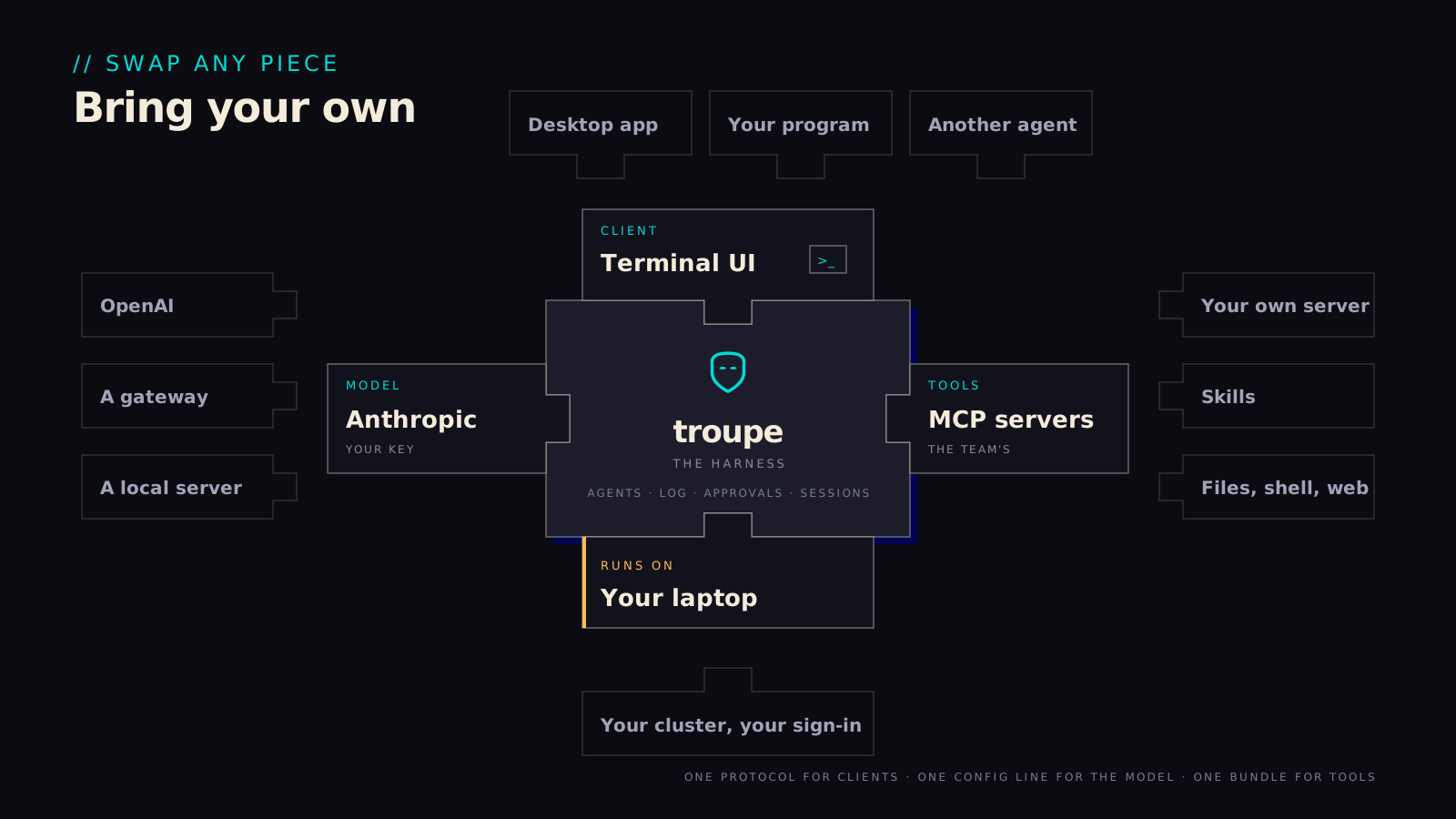
The harness has four sockets, and we have tried hard to have no favourite piece for any of them.

Which client drives it, which model thinks, which tools it may use and where it runs are each a choice you make separately. The model socket takes Anthropic, OpenAI or a gateway you already run. The tools socket takes the team's MCP servers and your own. The client socket takes the terminal, the desktop app or something you wrote against the protocol, and the last one takes a laptop or your cluster with your sign-in. In practice this means adopting Troupe doesn't commit an organisation to a model vendor or a hosting answer it hasn't already made up its mind about.

The harness as a puzzle piece with four sockets: client, model, tools, where it runs.
04-bring-your-own.svg
// THE DATA MODEL

The nouns, and the three objects that govern a session.

// THE NOUNS

Actors, sessions, profiles

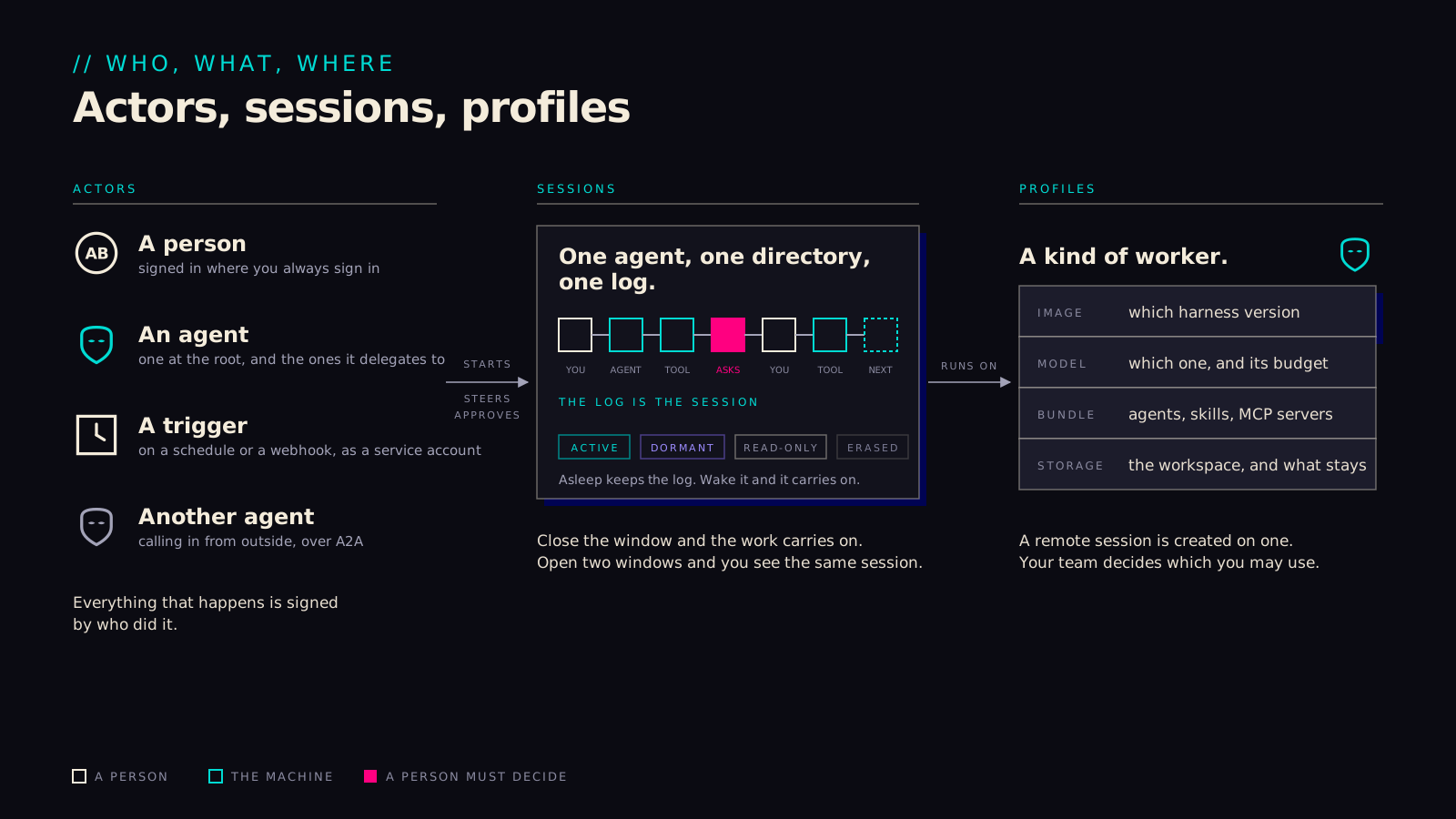
Three nouns carry most of the system: an actor, a session and a profile.

Every event in a session names the actor that caused it, so "who approved this shell command" is answered by a line in the log rather than by a second system. The line is hash-chained to the one before it, and it is the same line a client, a restart and an auditor read. A session is nothing more than that log, which turns out to be a useful simplification: going dormant, waking up on another pod, being reviewed months later and being erased are all operations on one record. A profile is the one object that says where a team's sessions run and with what. The money is tracked per team, separately.

Who acts, what a session is, and what a profile carries.
05-actors-sessions-profiles.svg
// WHERE CONFIGURATION LIVES

Policy, profile, bundle

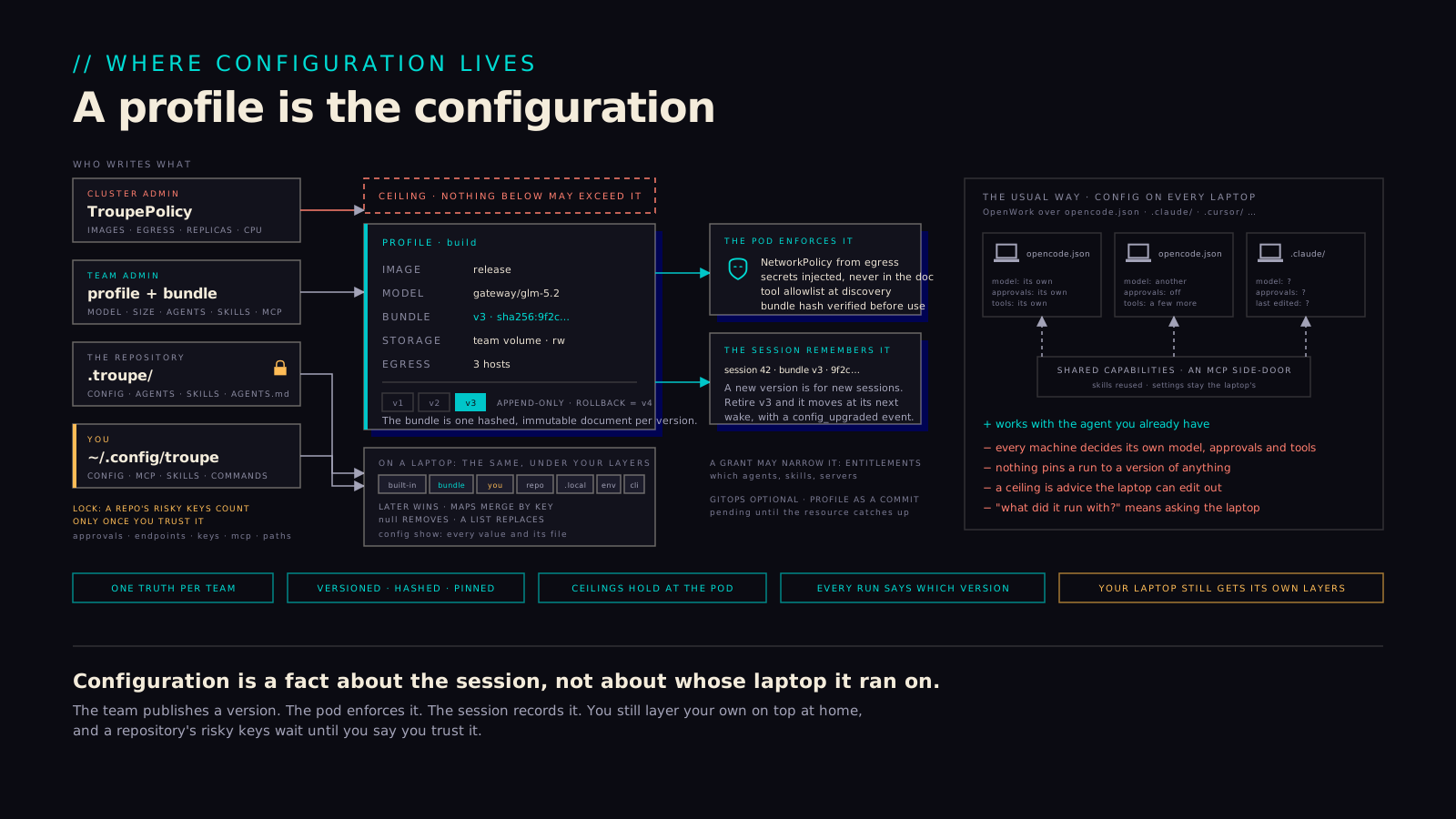
Three objects are easy to blur here, so it is worth separating them: the policy, the profile and the bundle.

The policy is the cluster administrator's ceiling: which images, which hosts, how many replicas and how much CPU any profile may ask for. Admission checks it, and the operator checks it again; where those sit is in the cluster section further down. The profile is the team administrator's choice of where sessions run and with what: image, size, model, storage, egress and the bundle channel to follow. The operator turns that into a network policy and injects the secrets, so none of it is written down in the clear. The bundle is what sessions carry, agents, skills and MCP servers, published as one hashed, immutable document per version. The pod verifies the hash before using it, and each session is pinned to the version it started on, which is what lets an audit say months later which agents and tools applied to a given turn. A new version applies to new sessions; retiring one moves the rest at their next wake, with an event in the log.

On a laptop the same bundle sits under your own layers, built-ins, then the bundle, then your config, then the repository's, then the environment, and later layers win by key. A repository's riskier keys only count once you have trusted the workspace. The faded panel on the right is the more usual arrangement, configuration on every laptop, where each machine decides its own model, approvals and tools and no run is pinned to a version of anything. We think the profile is worth the ceremony mainly because of that panel.
Who writes which layer; the profile as a versioned hashed bundle under a policy ceiling, enforced by the pod and remembered by the session.
14-a-profile-is-the-config.svg
// EXECUTION

What an agent does during a turn, what it runs as, and what it may touch.

// THINK, ACT, REPEAT

One turn

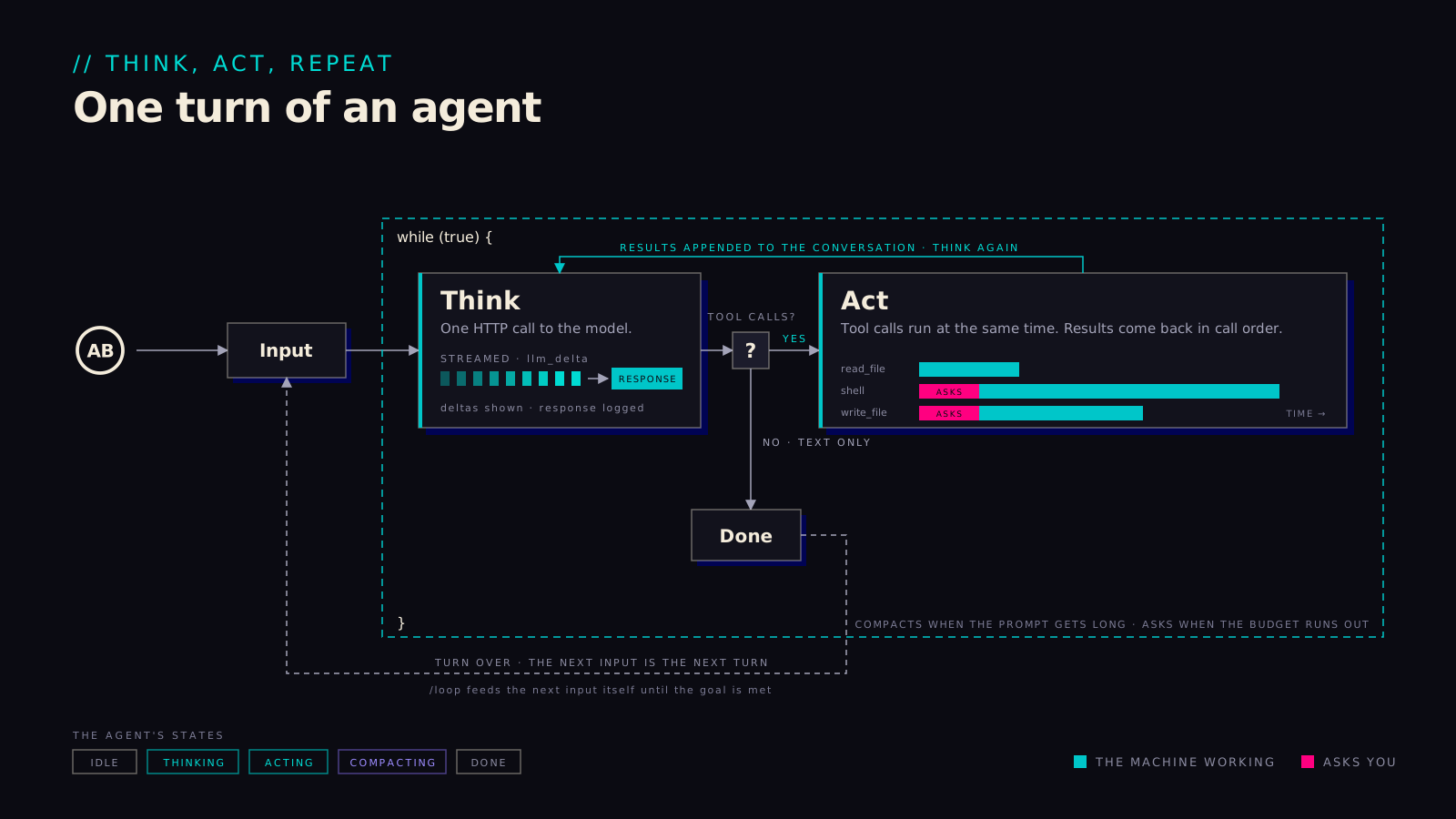
A turn is one input and everything the agent does with it, and the approval gates sit inside that loop rather than around it.

A yes is therefore specific: one call, one turn, recorded with who gave it. The agent will run several tool calls at once when it can, but a call that needs a person waits for that person, and nothing runs on their behalf in the meantime. Each streamed delta, each call and each answer lands in the log as it happens, so a client that attaches late sees exactly what one that was there saw. When a budget runs out the turn ends and the agent asks; it doesn't disappear.

One turn of an agent: the think, act, repeat loop with streaming deltas, tool calls and approval gates.
06-one-turn.svg
// SIX HABITS

Habits of the harness

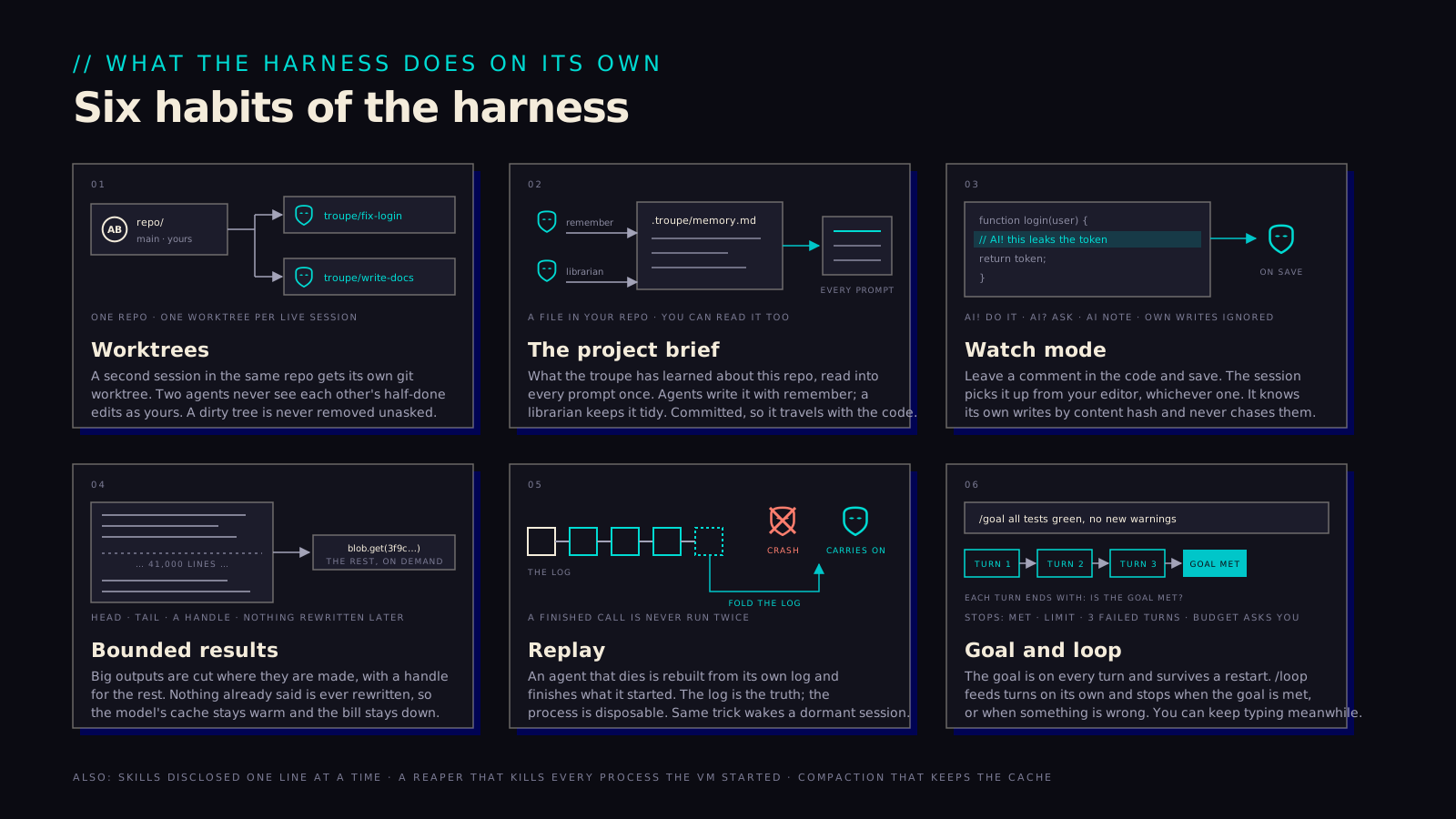
Six things the harness does without being asked. They look small until you have run an agent for a week without them.

  • Worktrees. A second live session in the same repository gets its own git worktree, so two agents never see each other's half-done edits as yours, and a dirty tree is never removed unasked.
  • The project brief. What the troupe has learned about a repository lives in a file in that repository, written by the agents themselves and read into every prompt. It travels with the code, and you can read it too.
  • Watch mode. An AI! comment in a file you save gets picked up from whatever editor you use. The harness recognises its own writes by content hash and leaves them alone.
  • Bounded results. A big output is cut where it is made, head and tail with a handle for the rest, and nothing already in the conversation is rewritten, so the model's cache stays warm and the bill stays down.
  • Replay. An agent that dies is rebuilt from its own log and finishes what it started, and a finished call never runs twice. The same trick wakes a dormant session.
  • Goal and loop. A goal is seen on every turn and survives a restart. A loop runs turns on its own and stops when the goal is met, at the limit, after three failed turns, or when the budget asks you.
Six habits of the harness: worktrees, the project brief, watch mode, bounded results, replay from the log, goal and loop.
10-harness-habits.svg
// WHAT A TOOL IS, AND WHO BRINGS IT

Who brings the tools

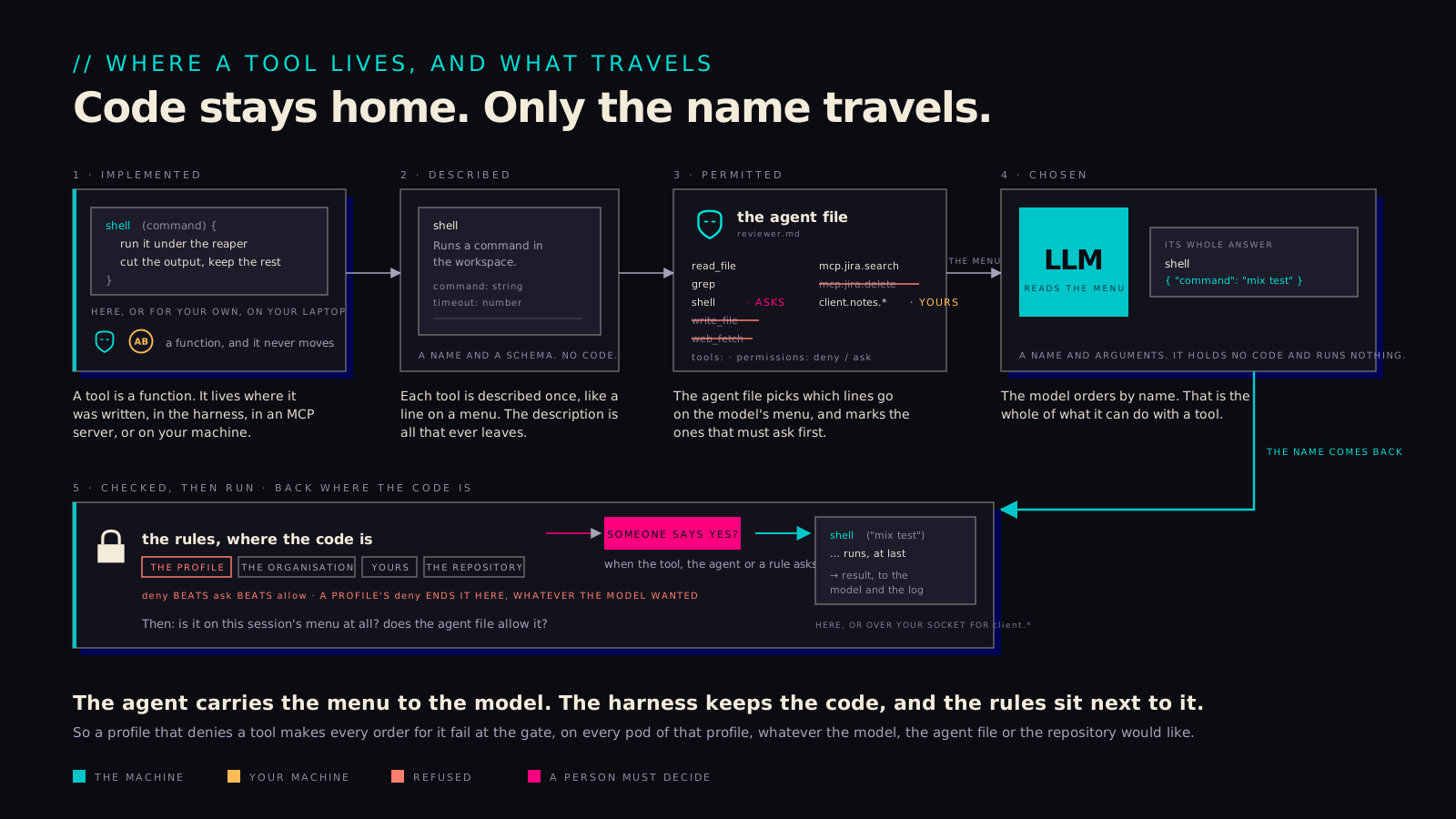
A tool is code that runs in the harness or on your client. The model only ever names one.

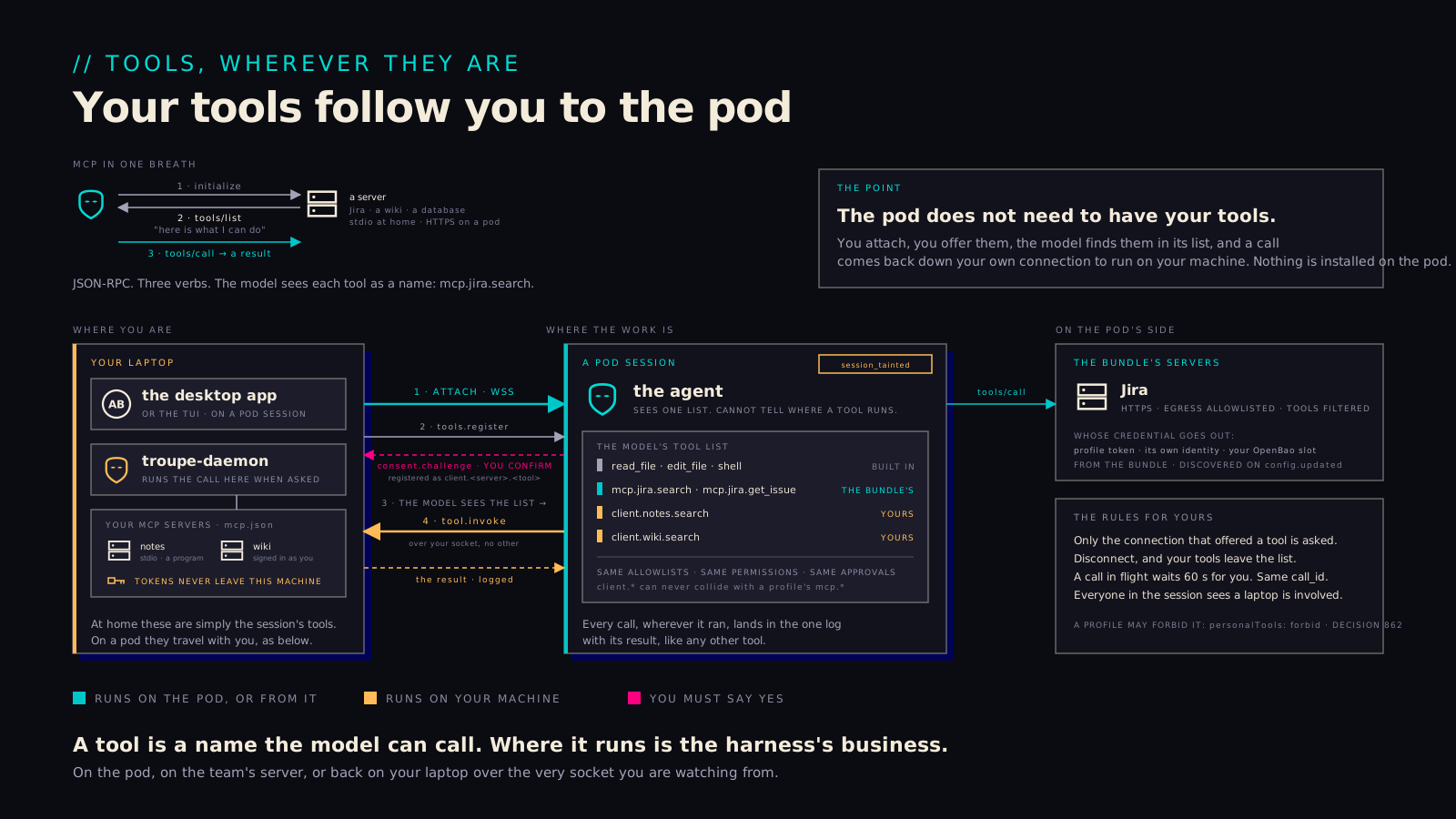
Tools come from four places. The built-ins are coded into the harness: reading and editing files, running a shell command, fetching a page, delegating, remembering. A team's MCP servers come with the profile's bundle and are called as the profile; a workspace can bring its own servers, which run once you have trusted it; and you can bring the servers you signed in to on your laptop, which run there. MCP itself is a small protocol: a server lists what it can do, the harness asks it to do one of those things, and the answer comes back as text. The model never sees the code behind any of this, only names and schemas, and it cannot run anything itself. It asks for a tool by name, with arguments, and waits.

Two things decide what happens next. The agent's file decides what the model is shown: a tool outside its tools: list or set to deny in its frontmatter is simply absent. Then, when the model names one, the harness checks the call before any code runs: the tool exists and was offered to this session, the agent allows it, and the rules from the profile, the organisation, your own config and the repository agree, where deny beats ask beats allow whichever file each is in. If a yes is still needed, a person gives it. Only then does code run, in the harness or back on your client. So a profile that denies a tool makes the call fail on every pod of that profile, whatever the agent file, the repository or the model would prefer. The list the model is sent is a convenience for the model; the check in the harness is the boundary.

Five stages: a tool implemented as a function that never moves, described as a name and a schema, permitted by the agent file, chosen by name by the model, then checked against the rules where the code is and run.
17-who-brings-the-tools.svg
// A ROLE IN A FILE

An agent is a file

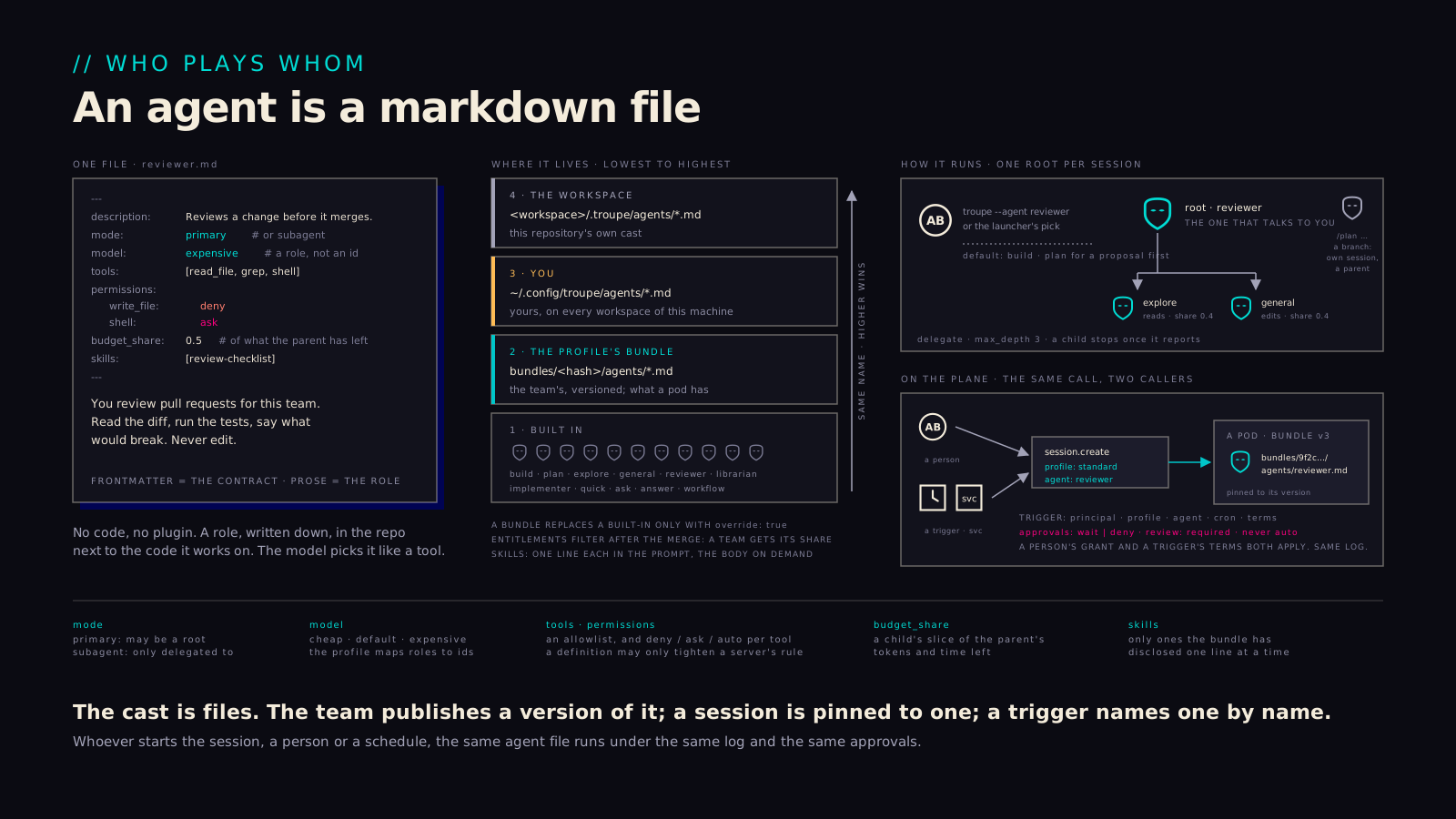
An agent is a markdown file: a frontmatter block the harness enforces, and a prose role the model reads.

That makes a role something you review, version and ship like code. The frontmatter says which model role, which tools, which permissions and what share of the budget; the prose says who the agent is. Four layers can hold one, lowest to highest: the harness's built-ins, the profile's bundle, your own configuration and the workspace's .troupe/agents/, with the highest file of a given name winning. A session has one root agent, which may delegate and branch, and the same session.create starts it whether a person asked or a trigger fired. On a pod the file is read from the pinned bundle, so what runs is what was published, and a role that only ever existed on one engineer's disk can't turn up there.

An agent as a markdown file: the frontmatter contract and the prose role; the four layers; one root per session with delegation and branches.
15-agents.svg
// TOOLS, AND WHOSE THEY ARE

MCP tools

The pod doesn't need to have your tools installed. They follow you.

A team's servers arrive with the bundle and are called under the profile's identity, so everyone granted the profile sees the same thing. Your own servers arrive with you: you attach, you are asked once whether to offer them and which, the model finds them in the same list as everything else, and a call to one of yours goes back over your own connection to run on your machine with your sign-in. The token stays on the laptop, the tools leave when you do, and everyone in the session can see that a laptop is involved. A profile may also forbid personal tools on its pods, which some teams will want for pods that should take only what the profile names.

MCP in one breath; one pod session whose tool list holds built-ins, the bundle's servers and your laptop's tools; attach, offer with consent, discover, and a call sent back over your own socket.
16-mcp-tools.svg
// WHO IS CALLING

Whose name a call carries

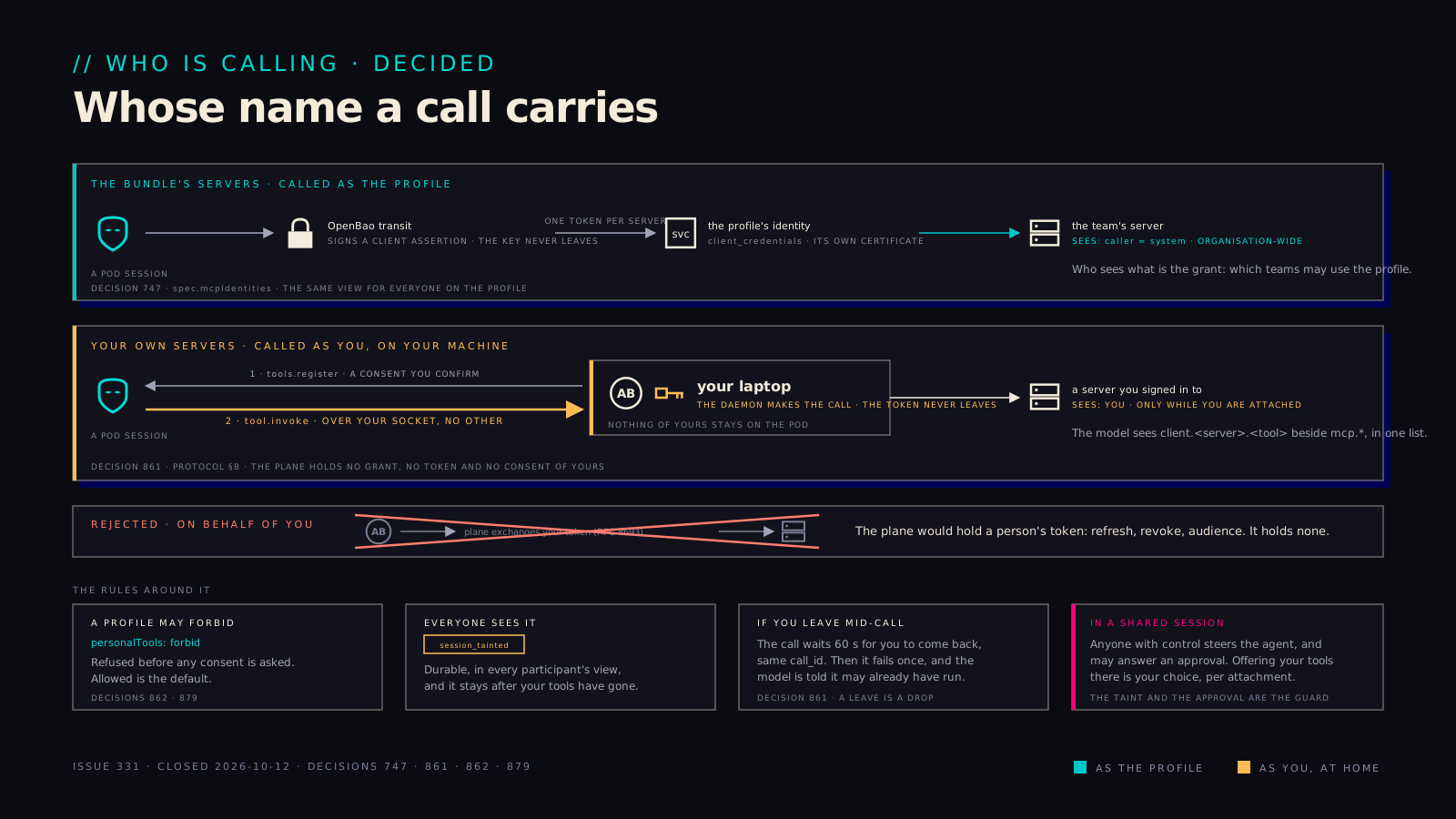
A profile's servers are called as the profile. A person's own servers are called as the person, from the person's machine. We settled on nothing in between.

The question got sharp in shared sessions, where anyone with control can steer the agent toward whatever tools are offered. The answer came in two halves. A server a team put in a bundle is called under the profile's own identity, so it answers organisation-wide and the grant decides who gets that view. A server you signed in to yourself is called back on your laptop, over your socket, and never from the pod; the plane never sees your token. We rejected the middle option, where the plane would exchange your token on your behalf, because it would have made the plane a holder of personal credentials, with all the refresh and revocation that implies. Around that rule sit a few smaller ones: a profile may forbid personal tools on its pods, everyone in a session is shown when one is in play, and a call whose owner left mid-turn waits a minute for them and then fails once, with a note to the model that it may already have run.

Two lanes: the bundle's servers called as the profile, a person's own servers called as the person from their machine; the on-behalf-of option crossed out; the four rules around it.
13-whose-identity.svg
// INFRASTRUCTURE

How the above is hosted, secured, automated and scaled on a cluster.

// WHAT RUNS WHERE

On the cluster

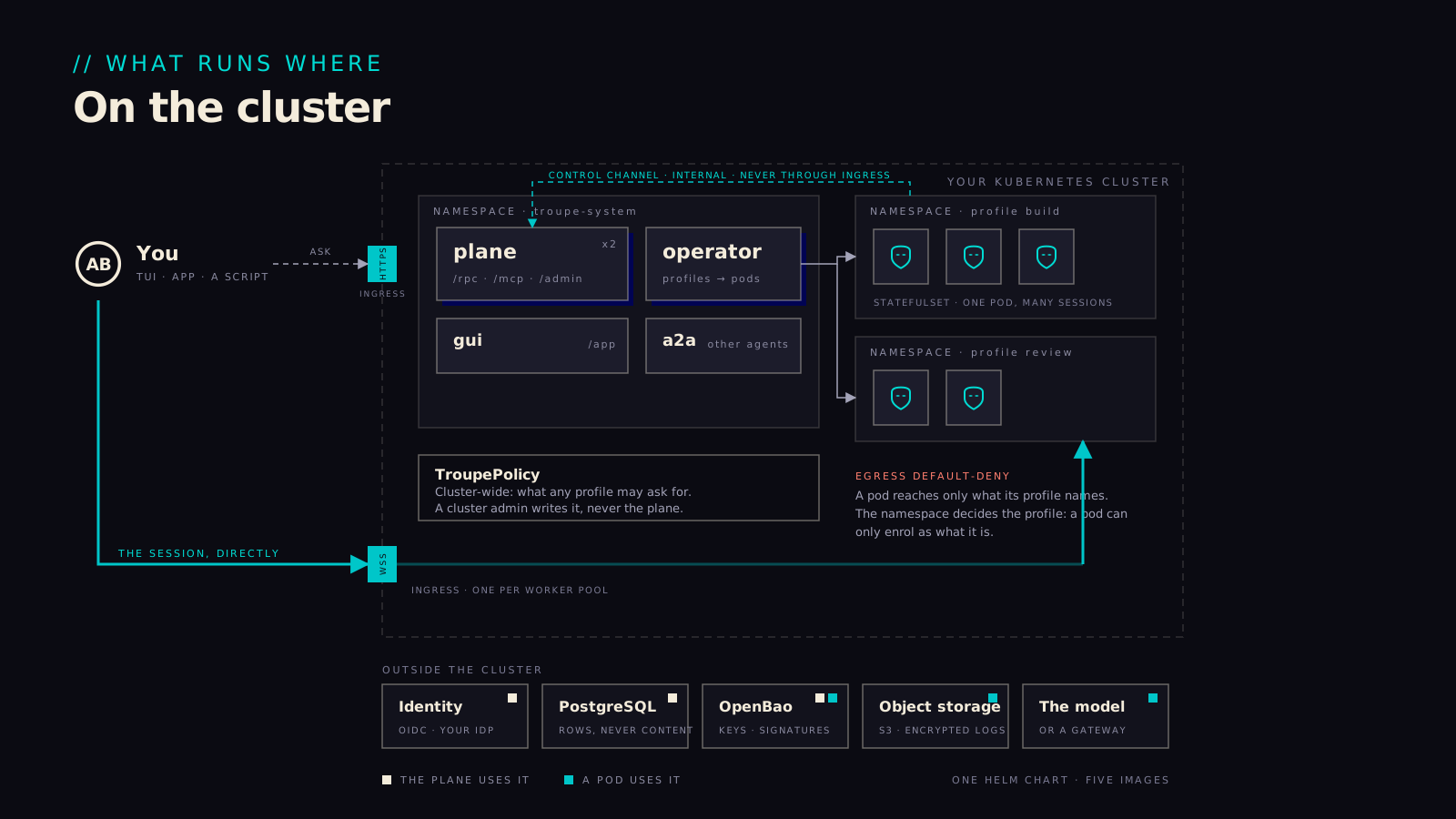
Each profile gets a namespace of its own, with two kinds of door in and a short list of places it may reach out to.

The plane, the operator and the console share the system namespace, usually with OpenBao beside them. A profile's pods get their Secrets injected and a network policy that admits the plane's internal control channel and the hosts the profile names, and that is the whole list: the model, its MCP servers, storage and OpenBao, and never the cloud's metadata service. People come in through the plane's HTTPS ingress to ask for a session, then through a worker ingress to their pod. For a security reviewer the useful consequence is that reading one profile file tells you what its pods can touch, and a compromised pod is contained to one namespace and those hosts.

The system namespace, one namespace per profile, two ingresses, the internal control channel, and outside services.
07-on-the-cluster.svg
// THREE JOBS FOR ONE KEY MANAGER

Keys, and erasure

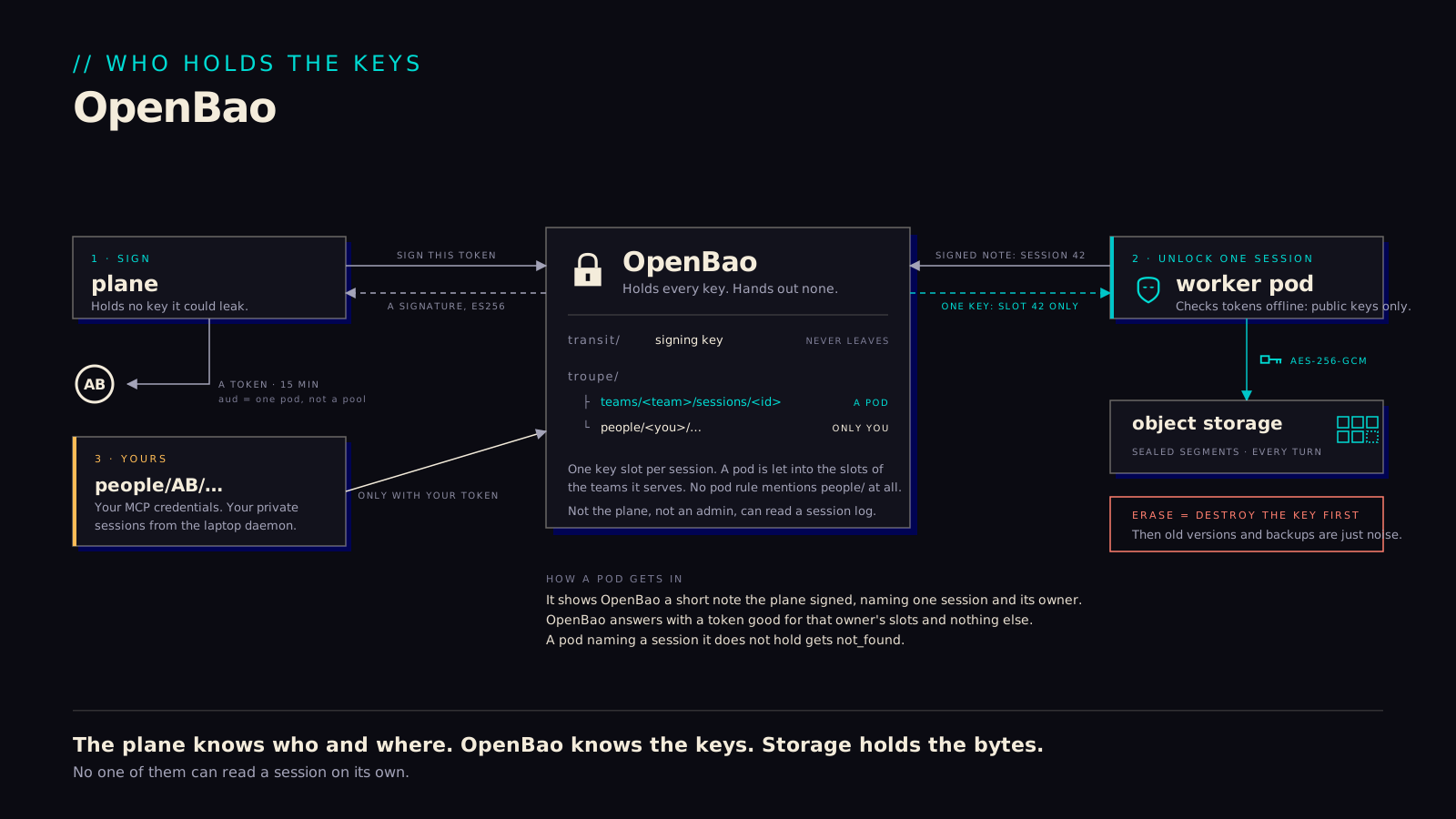
We rely on OpenBao to hold all the keys, which means the plane itself never touches them.

The plane can still sign things, tokens, its version policy, the organisation's document, because OpenBao signs for it with a key that can't be exported. A pod opens only the key slots of the teams it serves, one slot per session, so a pod that names a session it doesn't hold gets nothing back. A person's private sessions and their own tool credentials sit in slots nobody else can open, administrators included. Erasure works by destroying the key first. After that the session's bytes are noise wherever they still happen to sit, in the object store, in a backup, on a pod that hasn't drained yet, and deleting the rows afterwards is just tidying up.

OpenBao's three jobs: signing the plane's tokens, one key slot per session, a person's own slots; erasure by destroying the key first.
08-openbao.svg
// WORK NOBODY STARTS

Triggers

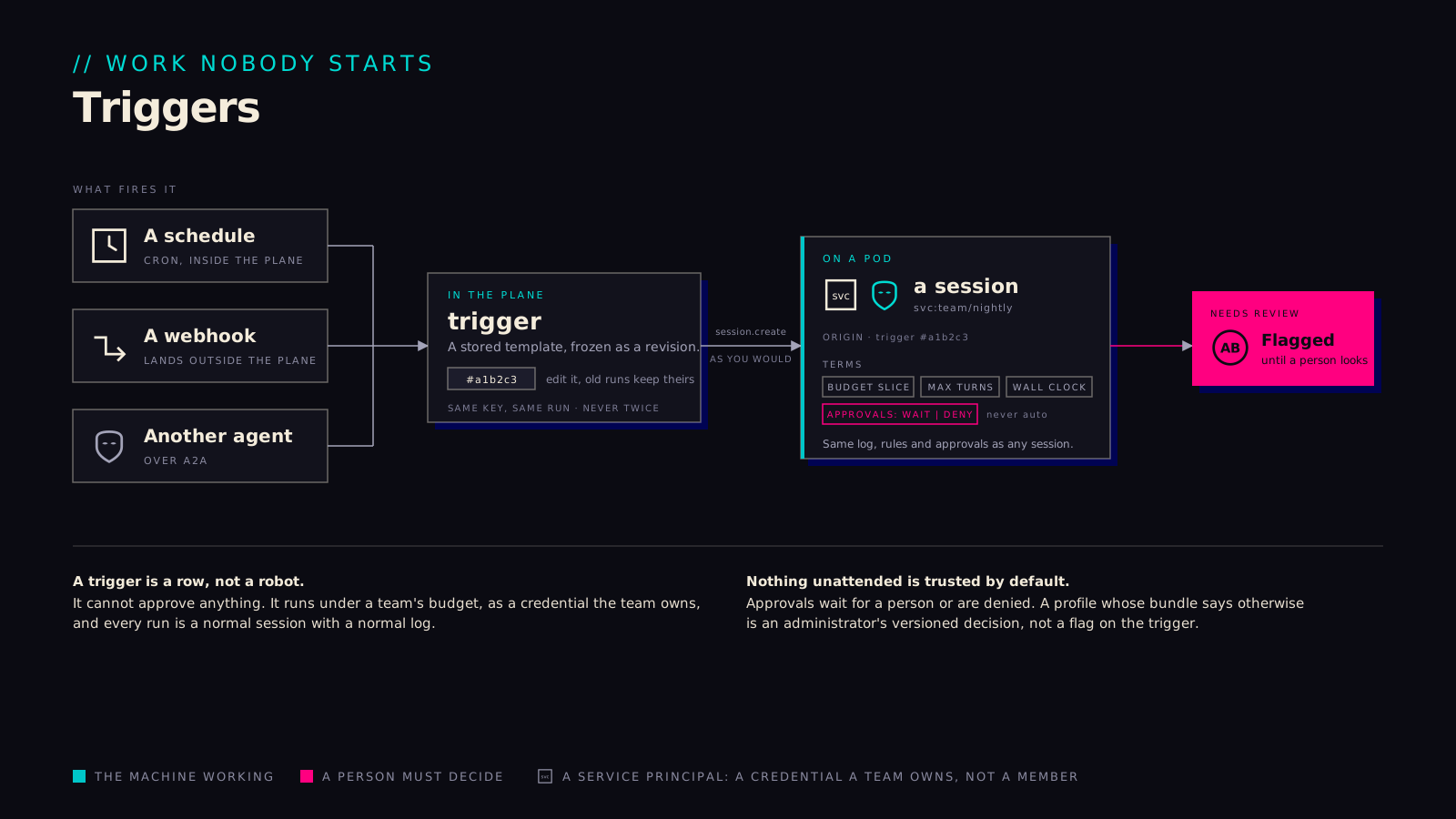
A trigger is a request frozen in advance and run under terms, by a credential the team owns.

What fires is a revision, hashed, so a run is exactly what was approved rather than whatever the file says today, and the session carries that hash in its origin. The terms cap money, turns and time, and approvals are set to wait or to deny; there is no auto. The session runs as a service principal with a subset of the team's grants and no admin role, so a trigger can do at most what the team could. Every run is flagged for review until someone looks at it, and firing the same key twice gives you the same run back rather than a second one. Taken together, this is what makes unattended work something you can let happen overnight and read about in the morning.

A schedule, a webhook or another agent fires a trigger frozen as a revision; the session runs as a service principal and is flagged for review.
09-triggers.svg
// SCALING FROM DEMAND

It breathes

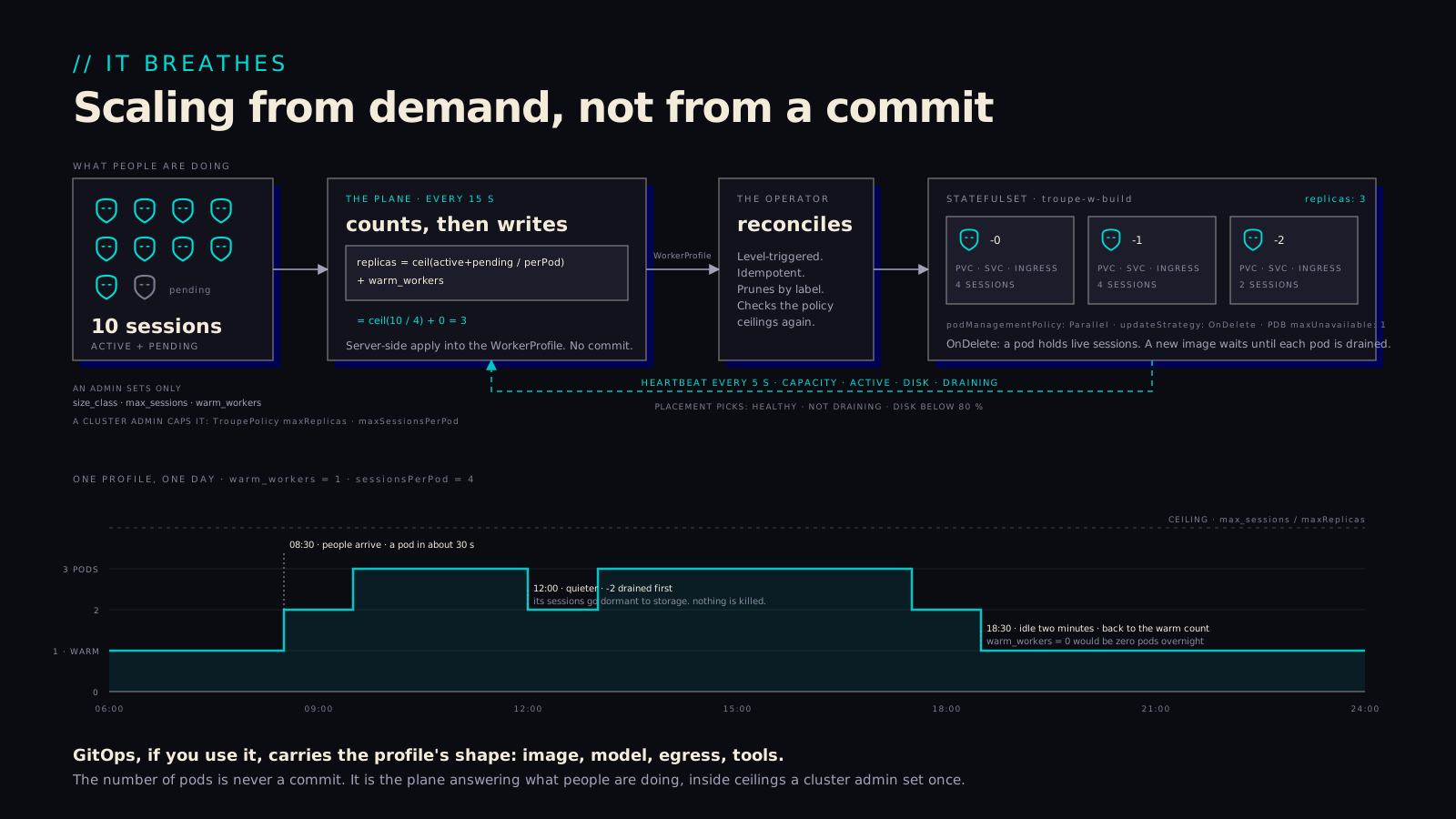
Pods follow demand. The number of them is computed, and nobody commits it.

Every fifteen seconds the plane counts a profile's active and pending sessions, divides by the sessions a pod holds, adds the warm count, and writes the result into the profile's resource; the operator reconciles the StatefulSet to that number and the pods report back. Cost tracks use with no one in the loop, inside ceilings a cluster administrator set once. Scaling down is careful about it: placement stops first, running turns finish, sessions go dormant to storage, and only then does the pod go away. A profile with no warm workers sits at zero pods overnight and has one running about half a minute after the first session in the morning. GitOps, where it is used, carries the shape of a profile; the replica count never passes through a commit.

The plane recomputes replicas every fifteen seconds, the operator reconciles, pods heartbeat; one profile over one day, draining the highest ordinal first.
12-it-breathes.svg
// WHY IT IS BUILT THIS WAY

The runtime underneath, and the trade we took.

// WHY ERLANG

Why it is built this way

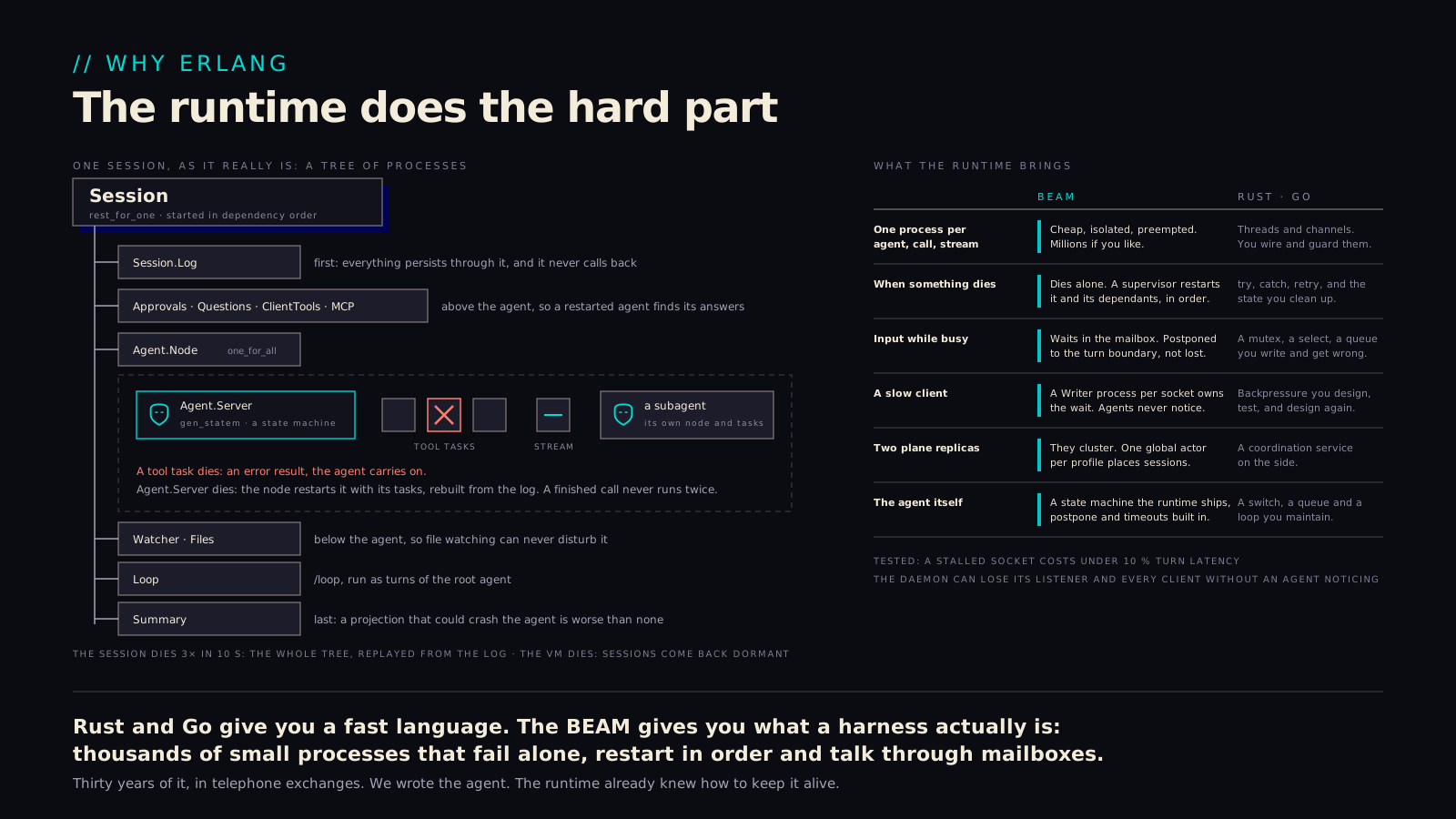
Most of the guarantees above come from the runtime rather than from code we wrote, which is the real reason this is Erlang.

A tool that crashes takes nothing else down. An agent that dies gets rebuilt from the log and carries on. A slow or vanished client never stalls a turn, and two plane replicas agree on where a session lives. In most languages each of those is a failure path someone writes by hand and, in our experience, gets subtly wrong; on the BEAM they are what a supervision tree, a mailbox and a cluster do by default, and have done in telephone exchanges for about thirty years. Fewer hand-written failure paths leaves fewer places for the guarantees to be false. The cost is a runtime fewer people know, which we accept. This picture is the one on the page drawn for the engineers who will live with that choice: its names are the real ones, and the ledger on the right is the argument.

A session as its supervision tree with the failure rules drawn on, and a ledger of what the BEAM brings against hand-written Rust or Go.
11-why-the-beam.svg
Open the file