Quick start
A laptop, ten minutes and a key for a model. By the end of this page you have installed Troupe, run a session, seen what it spent, capped what the next one may spend, and know what a plane would add. Troupe's own words are in the glossary.
The blocks marked for it in this page's source run in CI, on Linux and on Windows, against
the latest release: every night, and on every change to this page
(quick-start.yml). What CI cannot run is at the
end.
1. Install
On Linux or macOS:
curl -fsSLO https://github.com/it-minds/troupe/releases/latest/download/install.sh
sh install.sh --tui
On Windows, in PowerShell:
irm https://github.com/it-minds/troupe/releases/latest/download/install.ps1 -OutFile install.ps1
powershell -ExecutionPolicy Bypass -File .\install.ps1 -Tui
That installs the latest release's daemon, troupe-daemon, and its
terminal client, troupe, for your user alone: in ~/.local/bin, or
%LOCALAPPDATA%\Programs\troupe on Windows. Every download is checked against the release's
SHA256SUMS first, and against the release's signature where
minisign is installed; in a terminal the script
shows its plan and asks before it changes anything; read it before you run it if you like.
--gui (-Gui) adds the desktop app, and --vscode (-VSCode) the
VS Code extension where VS Code is.
The programs carry no Apple or Microsoft signature yet. The installers download with
curl and Invoke-WebRequest, which Gatekeeper and SmartScreen rarely stop; for a
download made in a browser, the first time:
- macOS refuses to open it: System Settings → Privacy & Security, then Open
Anyway beside the message about Troupe, or
xattr -d com.apple.quarantine
  ~/.local/bin/troupe
. - Windows says "Windows protected your PC": More info, then Run anyway.
What makes that safe is the release's own signature, which troupe update and the desktop
app check before every update (security).
Open a new terminal, so that the PATH the installer set is read, and check:
troupe --version
2. Bring your own key
Troupe runs no model of its own. It calls the provider you name, with your key, and charges you nothing. The shortest way in is a key in the environment:
export ANTHROPIC_API_KEY=sk-ant-... # PowerShell: $env:ANTHROPIC_API_KEY = "sk-ant-..."
troupe config
troupe doctor
troupe config says which provider and model a session will use. With no key anywhere it
asks instead, for Anthropic, OpenAI, a gateway such as LiteLLM, or
your organisation's plane, and writes the answer to config.yaml; troupe setup asks the
same on screens. troupe doctor checks the setup one line at a time, the key by asking
the provider for its list of models, which costs nothing. What each checks, and
troupe doctor --bench, an offline run of the harness itself, are in
the first run; every setting, and which file wins, in
configuration.md.
3. A first session
Make a directory with something wrong in it, and ask about it:
mkdir hello-troupe && cd hello-troupe
printf 'def add(a, b):\n    return a - b\n' > add.py
troupe run plan "Read add.py and say in one sentence what is wrong with it." --headless
mkdir hello-troupe; cd hello-troupe
Set-Content add.py "def add(a, b):`n    return a - b"
troupe run plan "Read add.py and say in one sentence what is wrong with it." --headless
troupe run starts a session in this directory, its workspace,
and prints what the agent does, a line for each event, until it comes
to rest. plan is the agent that reads and never writes, so nothing in this run needs you;
the exit code says how it ended (the codes).
Now have it fixed, in the terminal UI:
troupe
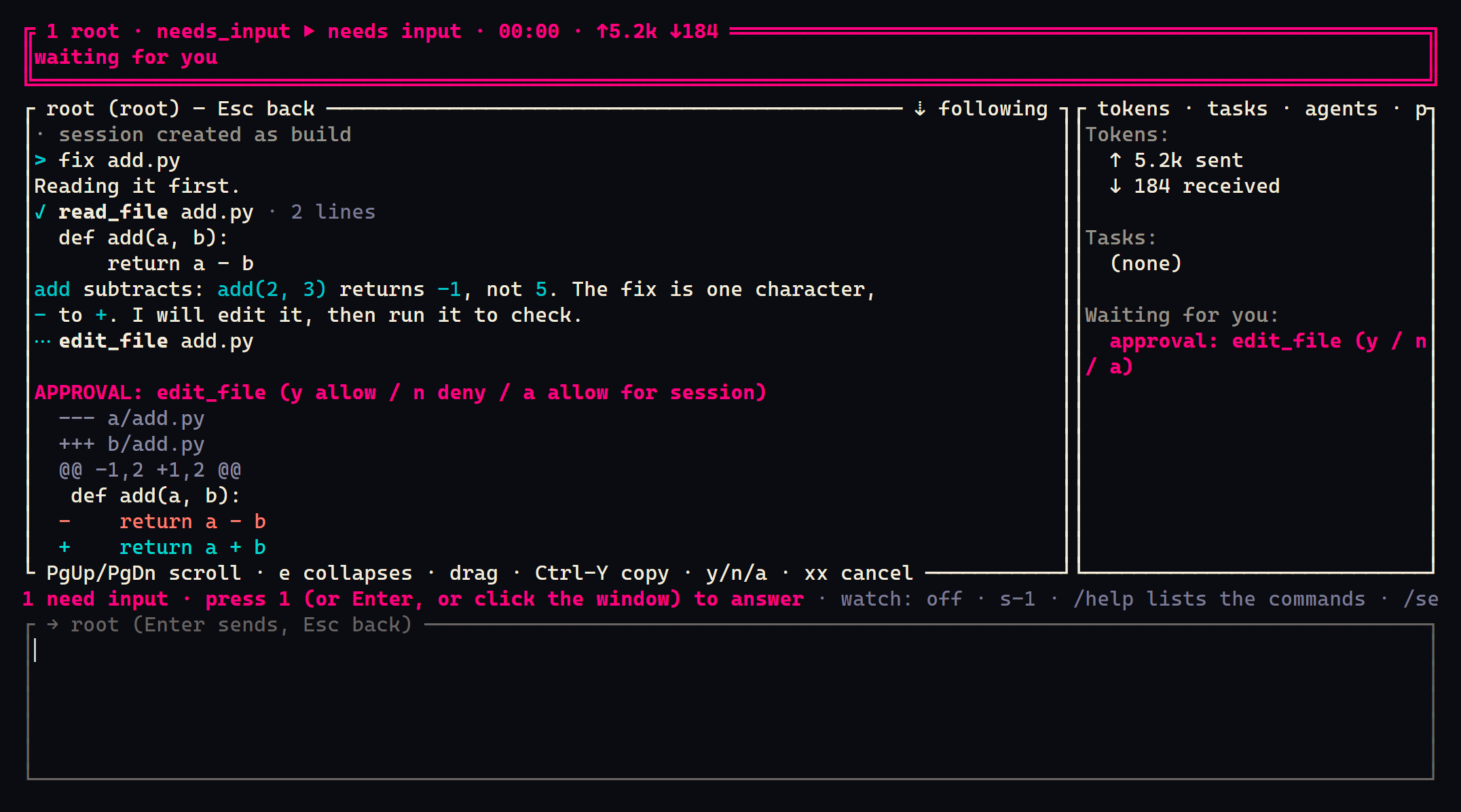
Type fix add.py and press Enter: the build agent takes it, in a window of its own.
Reading is automatic; editing a file and running a command are not. The agent stops at
each and its window asks for an approval: press the window's number
(or Enter) to open it, then y allows it, n denies it, a allows that tool for the rest
of the session. Ctrl-D quits.
With no daemon running on its own, troupe runs one inside itself, so the session stopped
when you quit. Its log is kept, and troupe resume opens the session
where it was. To keep
sessions working with no window open, run the daemon on its own, troupe daemon run in a
terminal you leave open, troupe daemon login on to have it start every time you log in,
or use the desktop app, which starts it; every client on the machine then sees the same
sessions.
4. What it cost
Every model call's tokens are in the session's log. The terminal UI shows each window's
tokens sent and received (↑5.2k ↓184), and the desktop app shows each session's cost. The
log is JSON, a line an event, under ~/.local/state/troupe/sessions/
(%LOCALAPPDATA%\troupe\sessions\ on Windows), and it answers the question by itself. With
jq, for every session on this machine, which after this page is three (the plan run,
the terminal UI's session, and the window fix add.py opened, which is a session of its
own):
cat ~/.local/state/troupe/sessions/*/*/events.jsonl | jq -s '
  [.[] | select(.type == "llm_response") | .data] | {
    model_calls: length,
    input_tokens: (map(.usage.input_tokens // 0) | add),
    output_tokens: (map(.usage.output_tokens // 0) | add),
    cost_usd: ([.[].gateway.cost_micros | numbers]
               | if length == 0 then "not priced" else add / 1000000 end)
  }'
A task this small is a couple of model calls and some thousands of input tokens, most of them the agent's instructions and tool definitions. The nightly CI runs a task like it against a real model and lists what each run used (developer/ci.md); a recent one took two calls, about 7,500 input tokens and 50 output tokens. Your model and your task will differ. At $3 per million input tokens and $15 per million output tokens, figures for the example and not anybody's price list, that run cost about two cents.
Troupe keeps no price table of its own. A call's cost is what your gateway reports, as
LiteLLM does, or what you tell it the model costs; a provider's own endpoint reports
tokens only, so cost_usd above says not priced until you write your price into
config.yaml:
models:
  prices:
    claude-sonnet-5: {input: 3, output: 15}   # dollars per million tokens: your model's price, by the name you use for it
5. Cap the next one
Every agent has four limits, and the defaults are generous: 40 model calls, 2,000,000 input tokens, 400,000 output tokens and 30 minutes. At the example prices that is up to $12 of tokens. The agents a session delegates to draw on its tokens and its time, so those two limits hold for the whole session; only the model calls are counted per agent. A first week needs less:
mkdir -p ~/.config/troupe
cat >> ~/.config/troupe/config.yaml <<'EOF'
max_turns: 10
max_input_tokens: 200000
max_output_tokens: 20000
EOF
troupe config --explain max_input_tokens
New-Item -ItemType Directory -Force "$env:APPDATA\troupe" | Out-Null
Add-Content "$env:APPDATA\troupe\config.yaml" "max_turns: 10`nmax_input_tokens: 200000`nmax_output_tokens: 20000"
troupe config --explain max_input_tokens
--explain shows the value in force and which file set it. Now a session stops after 10
model calls, 200,000 input tokens or 20,000 output tokens: at most $0.90 at the example
prices. At 80% of any limit the agent is told. At the limit the terminal UI and the desktop
app ask you how much more, for this run, this session or this workspace, or whether to
stop; a headless run has nobody to ask, and stops. Nothing carries on silently.
troupe --full-send lifts the limits for one session, and even then a tool that fails ten
times in a row stops the turn and asks. Every budget key is in
configuration.md.
What the limits do not count, so that you are not surprised: prompt tokens the provider
serves from its cache, which it bills at a fraction of the input price; a
branch you open in the terminal UI, which is a session with limits of
its own; and, the first time you open troupe in a git repository, a librarian session
that writes the project brief (memory_auto_refresh: false
turns that off).
6. What a plane adds
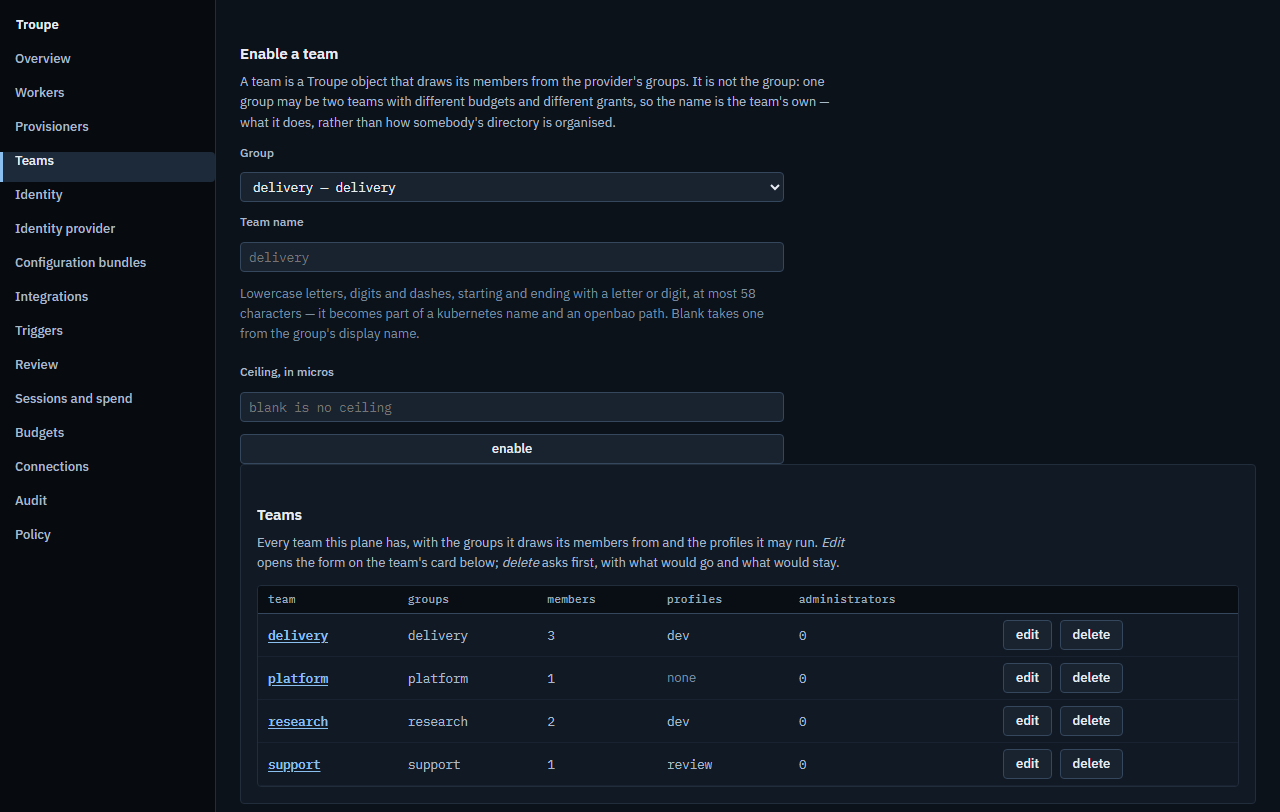
Everything so far ran on your machine and needed nothing else. A plane is the server a team runs on its Kubernetes cluster, and it adds:
- Sign-in and teams from your identity provider. Nobody has a Troupe password, and nobody edits membership in Troupe.
- Money budgets per team, per person and for the platform, reserved when a session starts and charged with what its calls cost.
- Sessions on worker pods, which keep working with every laptop closed and which a colleague can open with you.
- Profiles, bundles and triggers: what a team's sessions run on and carry, and work that starts on a schedule.
- An audit trail of every administrative change, with its diff, which can say whether it has been altered.
- A console at
/consolefor all of it.
With a plane's address from whoever runs it:
troupe login https://troupe.example.com
troupe --remote
troupe login signs you in with a code you type in your browser, where you already sign
in. The desktop app lists this machine's sessions and the plane's in one list. Whether you
need a plane at all: why-troupe.md. Running one:
admin/installing.md.
troupe update installs a newer release over these, once its signature checks against
the release key (updating), and the desktop app updates itself. To
remove Troupe again: sh install.sh --uninstall, or -Uninstall on Windows; add
--purge (-Purge) to remove its settings and session logs too.
What CI does not run
The job runs every marked block above, in order, as one script: the sh ones on Ubuntu
and the powershell ones in PowerShell on Windows, from the installers a reader downloads.
It cannot run:
- your key. It sets
TROUPE_PROVIDER=fakeinstead, a scripted model that answers from a file, so every command runs for real and only the model's answer is canned. - the terminal UI.
troupeneeds a person at a terminal; the TUI's own suite draws it headless. - macOS. The Linux job runs the same
install.sh; the macOS builds are smoke-tested bynative.ymlnightly and at every release. - a plane. Section 6 is a pointer, not a step.